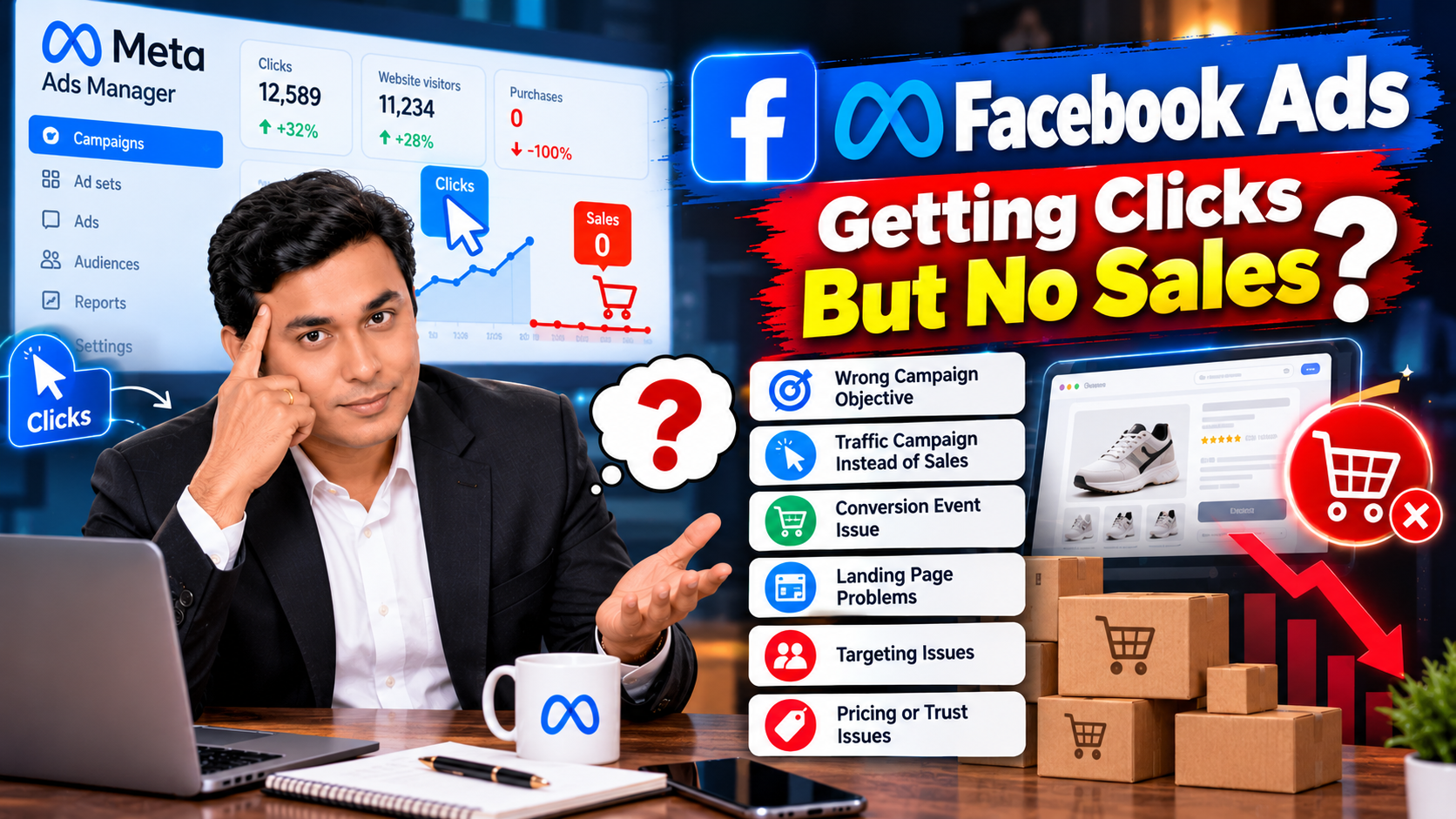
Your Facebook Ads are generating clicks. People are visiting your website. Your advertising budget is being spent every day.
But where are the sales?
If this sounds familiar, you could be dealing with one of the most frustrating problems in digital advertising: getting website traffic without generating purchases.
The first thing you need to understand is that clicks don’t automatically translate into sales. You can attract thousands of visitors, but if your campaign reaches the wrong people, your website fails to build trust, or your checkout process creates friction, your advertising expenditure may not deliver the results you expect.
From my experience in digital marketing, one of the first things I investigate when a campaign gets clicks but no sales is whether the campaign is optimized for the right outcome.
Let’s look at five practical ways to diagnose and fix this problem.
1. Check Whether You’re Running a Traffic Campaign or a Sales Campaign
This is one of the first things I’d check if your Facebook Ads are generating clicks but no purchases.
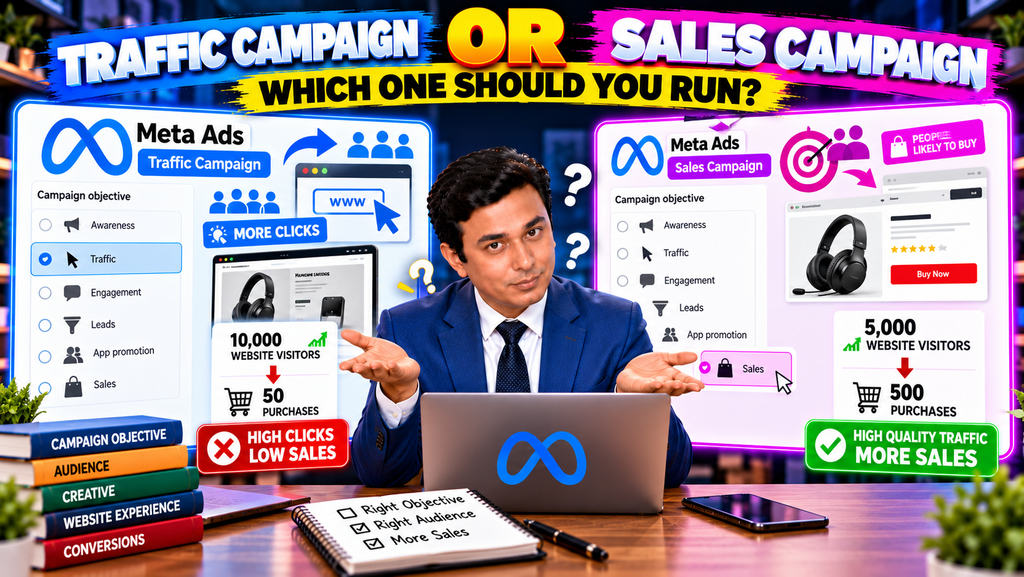
Meta Ads offers different campaign objectives to help advertisers achieve different outcomes. If you select the Traffic objective, you generally tell Meta that your priority is getting people to visit a destination, such as your website.
If your actual goal is to sell products, however, website visits alone aren’t enough.
Imagine you’re selling wireless headphones through an e-commerce website.
You launch a Traffic campaign, and Meta delivers your advertisements to people who are likely to click and visit your website. Your campaign generates thousands of visitors, but very few people buy anything.
Why?
Because clicking an advertisement and purchasing a product are two different actions.
Someone may click because your creative looks interesting, your product catches their attention, or they simply want to explore. That doesn’t necessarily mean they have a strong intention to purchase.
How to Fix It
If your primary objective is online sales, consider using the Sales objective with the appropriate website conversion location and Purchase optimization event, provided your tracking is configured correctly.
Meta’s delivery system uses the selected optimization goal to help determine which people are most likely to complete the desired action. Choosing Traffic doesn’t automatically instruct the system to prioritize purchasers.
Before launching the campaign, verify that:
- Your campaign objective aligns with your business goal.
- Your website is selected as the conversion location when appropriate.
- Your Purchase event is configured correctly.
- Your Meta Pixel and, where appropriate, Conversions API are sending reliable event data.
- Your campaign reports the same purchase actions that matter to your business.
If you want sales, optimize for sales rather than assuming that more website traffic will eventually produce more purchases.
2. Choose the Right Conversion Event: Purchase or Initiate Checkout?
Let’s say you’ve already created a Sales campaign, but your website receives clicks without generating purchases.
What should you do next?
You need to examine your conversion data and understand how far visitors are progressing through your sales funnel.
For an e-commerce business, the customer journey might look like this:
Advertisement → Product page → Add to cart → Initiate checkout → Purchase
Each step tells you something about customer behaviour.
- Add to cart: The visitor has shown interest in a product.
- Initiate checkout: The visitor has started the checkout process.
- Purchase: The visitor has completed the transaction.
These events aren’t interchangeable. A checkout initiation is a useful signal, but it isn’t a sale.
Should You Start With Initiate Checkout Before Optimizing for Purchase?
In some situations, testing an earlier funnel event may help you understand whether visitors are progressing towards a purchase. It may also provide more frequent optimization signals when purchase volume is very low.
However, I wouldn’t automatically recommend running an Initiate Checkout campaign until you get 50 checkouts and only then switching to Purchase optimization.
Meta’s learning-phase guidance commonly refers to approximately 50 optimization events per ad set within seven days as a benchmark for stabilizing delivery. The relevant event is the action the ad set is optimizing for, and reaching that threshold doesn’t guarantee profitability.
More importantly, 50 Initiate Checkout events are not a universal prerequisite for running a Purchase campaign.
If your business goal is purchases and you have reliable purchase tracking, Purchase optimization is generally the more direct starting point. Even when your campaign has limited conversion data, optimizing for a less valuable event simply to accumulate more events may attract people who perform that action without completing a purchase.
You can consider an earlier event when purchase volume is insufficient, but make that decision based on your budget, funnel data, and business requirements—not just the learning-phase threshold.
What Should You Check Before Changing the Conversion Event?
Ask yourself:
- Are visitors adding products to their carts?
- Are they starting checkout?
- Are they abandoning checkout before paying?
- Is the Purchase event firing correctly?
- Is the campaign receiving enough reliable data to evaluate performance?
If visitors rarely reach checkout, investigate your product page, offer, audience, and creative.
If many visitors initiate checkout but don’t purchase, investigate the checkout process, shipping costs, payment methods, and customer trust.
Changing the optimization event won’t automatically solve these underlying problems.
3. Investigate Your Landing Page and Product Page
Suppose your Meta Ads campaign is generating relevant clicks, and people are visiting your product page.
However, they leave without adding the product to their cart.
The issue might not be your campaign objective. It could be your website experience.
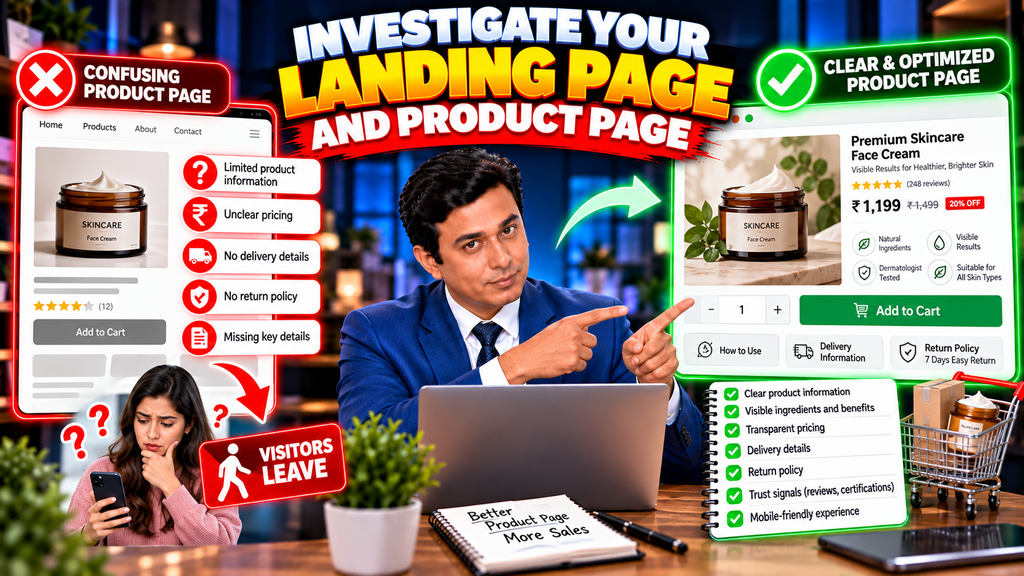
Imagine you’re selling a premium skincare product.
Your advertisement promises visible benefits, but the landing page doesn’t clearly explain the product’s ingredients, usage, price, delivery information, or return policy. The customer has to search for basic information before deciding whether to buy.
Some visitors may simply leave.
How to Fix It
Start by checking whether your landing page matches the promise made in your advertisement.
If your ad promotes a specific product, send visitors directly to its relevant product page rather than a generic homepage.
Make sure the page communicates:
- What the product is and who it is for.
- Its price and important product details.
- Clear, high-quality product images.
- Delivery charges and estimated delivery times.
- Relevant return, refund, or exchange policies.
- A visible and functional Add to Cart button.
Also, test the page on mobile devices. Many social media visitors browse on their phones, and a page that loads slowly or displays poorly can discourage purchases.
Check your page-loading performance, broken links, product availability, and checkout functionality.
You should also examine your landing-page conversion rate. If your advertisements generate relevant visitors but very few people add products to their carts, the problem may lie in the offer, page experience, or audience-product fit.
A better landing page won’t guarantee sales, but it can remove unnecessary obstacles that prevent interested visitors from purchasing.
4. Identify Trust Issues, Pricing Problems, and Checkout Abandonment
Sometimes, visitors like your product and even start checkout, but they don’t complete their purchases.
This is where you need to look beyond advertising metrics.
A customer might abandon checkout because shipping costs are unexpectedly high, their preferred payment method isn’t available, delivery takes too long, or the business doesn’t appear trustworthy enough.
These problems can be especially important for new brands that haven’t yet established a reputation.
How to Identify the Problem
Start by comparing the number of visitors at each stage of your funnel.
For example, imagine your campaign generates the following results:
- 1,000 website visitors.
- 100 add-to-cart events.
- 40 checkout initiations.
- 5 purchases.
These are hypothetical numbers, but they illustrate how funnel analysis works.
Your campaign has generated purchases, yet a substantial proportion of visitors who initiate checkout don’t complete their orders.
That doesn’t automatically mean checkout is the only problem. You should investigate the experience and verify that all events are measured correctly.
How to Improve Purchase Completion
Consider these improvements:
Make pricing transparent. Display product prices, delivery charges, and applicable fees clearly before customers reach the final payment stage.
Offer convenient payment options. Ensure the payment methods available are suitable for your target market and that the payment process works correctly.
Build credibility. Provide accurate business information, accessible customer support, clear policies, and genuine customer reviews where available.
Simplify checkout. Avoid unnecessary form fields, confusing steps, or mandatory account creation when it isn’t needed.
Check your offer. Compare your product’s perceived value, pricing, delivery terms, and benefits with the alternatives available to customers.
Don’t immediately assume that your advertising audience is wrong. If people are reaching checkout, your campaign may already be attracting interested visitors. You need to understand why those visitors aren’t completing the purchase.
5. Review Your Audience Targeting, Creative, and Offer
If your tracking works correctly, your website functions properly, and your checkout process is smooth, it’s time to examine the campaign itself.
Your advertisement might be attracting people who are curious about the product but aren’t suitable buyers.
For example, imagine you’re selling premium wireless headphones.
Your video advertisement uses an entertaining concept that attracts attention, but it barely communicates the product’s price, features, or intended customer. The advertisement may generate plenty of clicks without attracting people who are ready to buy.
This is a creative and audience-alignment problem.
How to Improve Campaign Quality
Make the creative relevant. Show the product clearly, explain its key benefits, and communicate what makes the offer worth considering.
Match the message to the audience. Your advertisement should attract people who are likely to value your product, rather than maximizing curiosity alone.
Test your offer. Depending on your margins, you could test product bundles, free shipping, useful product demonstrations, or other legitimate ways of improving perceived value.
Review audience quality. Examine the performance of your targeting approach and identify whether certain audience segments consistently generate better purchases or higher-value customers.
Measure actual sales. Don’t judge an advertisement solely by clicks or even add-to-cart events. Evaluate purchases, cost per purchase, revenue, and return on ad spend.
Avoid making too many changes simultaneously. Test meaningful variations and give each test an appropriate opportunity to collect data.
Your goal is to understand which combination of creative, audience, offer, and landing page generates profitable customers.
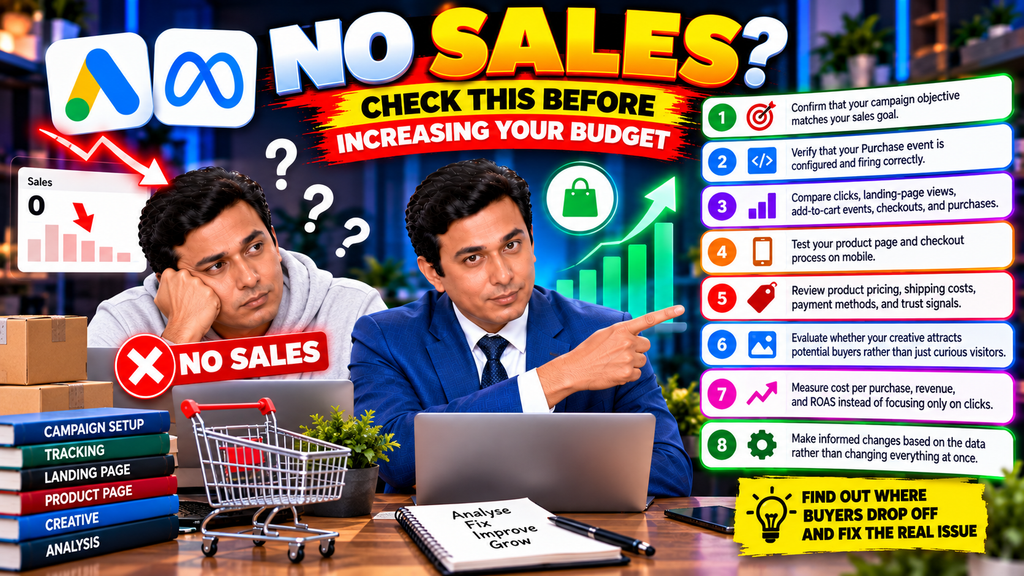
A Simple Checklist for Facebook Ads Getting Clicks but No Sales
Before increasing your advertising budget, work through this checklist:
- Confirm that your campaign objective matches your sales goal.
- Verify that your Purchase event is configured and firing correctly.
- Compare clicks, landing-page views, add-to-cart events, checkouts, and purchases.
- Test your product page and checkout process on mobile.
- Review product pricing, shipping costs, payment methods, and trust signals.
- Evaluate whether your creative attracts potential buyers rather than just curious visitors.
- Measure cost per purchase, revenue, and ROAS instead of focusing only on clicks.
- Make informed changes based on the data rather than changing everything at once.
This process helps you identify where potential customers are dropping out of the buying journey and which problem deserves attention first.
Conclusion: Don’t Confuse Clicks With Sales
If your Facebook Ads are generating clicks but no sales, don’t immediately conclude that Meta Ads doesn’t work.
Start by checking whether your campaign is optimized for the right outcome. Then investigate your conversion tracking, product page, checkout process, audience, creative, and offer.
If you’re running a Traffic campaign when your goal is purchases, consider whether a properly configured Sales campaign would be more appropriate.
If you’re already optimizing for Purchase, don’t automatically switch to Initiate Checkout just to collect more events. Understand where visitors are dropping out and whether the campaign has reliable conversion data.
Remember that advertising performance is determined by more than the number of clicks your campaign generates. The quality of the traffic, the relevance of your offer, the website experience, and the customer’s willingness to purchase all matter.
The objective isn’t to get more people to visit your website. It’s to turn relevant visitors into paying customers at a cost your business can sustain.
Frequently Asked Questions
1. Why are my Facebook Ads getting clicks but no sales?
Possible reasons include using a Traffic objective instead of a suitable sales-focused setup, incorrect conversion tracking, irrelevant traffic, a weak offer, poor landing-page experience, unexpected shipping costs, or checkout problems. Review your complete conversion funnel to identify the cause.
2. Should I use Traffic or Sales campaigns for an e-commerce website?
If your primary goal is online purchases, a Sales campaign configured for website purchases is generally the more direct option. Traffic campaigns are more appropriate when website visits or landing-page views are the intended outcome.
3. Should I optimize Meta Ads for Initiate Checkout before Purchase?
Not necessarily. If purchase tracking works and you can reasonably optimize for purchases, Purchase is the most direct event for a sales objective. An earlier event may be worth testing when purchase data is extremely limited, but it doesn’t guarantee better sales performance.
4. Do I need 50 Initiate Checkout events before running a Purchase campaign?
No. Approximately 50 optimization events within seven days is a commonly cited learning-phase benchmark, not a mandatory prerequisite for Purchase optimization. The event being counted depends on the optimization event selected for the ad set.
5. How can I tell whether my landing page is causing low sales?
Examine the funnel from landing-page views through add-to-cart, checkout initiation, and purchase. If visitors reach your website but rarely add products to their carts, investigate the page, offer, pricing, and traffic relevance. If checkout initiations are high but purchases are low, investigate payment, shipping, trust, and checkout usability.
6. Should I increase my Facebook Ads budget if I’m getting clicks but no sales?
Not before investigating the problem. Increasing spending on a campaign that isn’t converting can increase losses. First verify tracking, campaign optimization, traffic quality, and website performance, then scale when the results justify it.

Related Posts