Have you ever run a Google Ads campaign, spent thousands of rupees, received plenty of clicks, but generated very few leads or sales?
You’re not alone.
Many businesses invest in Google Ads expecting immediate results. They select a few keywords, write advertisements, set a daily budget, and launch their campaigns. However, after spending money, they discover that the traffic isn’t relevant, enquiries are poor, or conversions are simply not happening.
So, what’s going wrong?
In many cases, the problem isn’t Google Ads itself. It’s how the campaign has been planned, configured, and optimized.
From keyword selection to landing pages and bidding strategies, even small mistakes can affect your advertising performance. The good news is that many of these mistakes are avoidable.
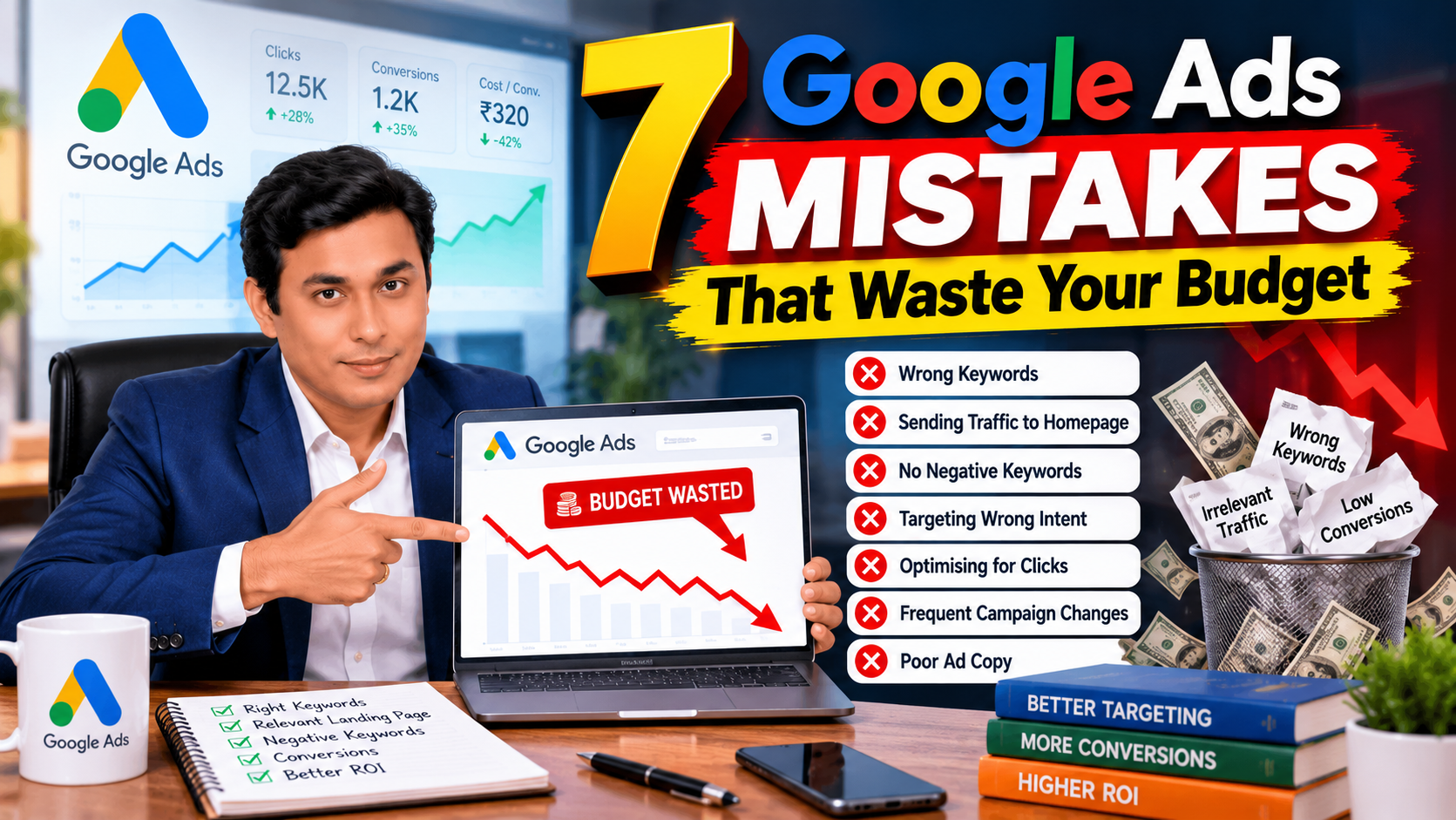
Let’s explore seven common Google Ads mistakes that can waste your budget and, more importantly, how you can fix them.
1. Using the Wrong Keywords in Your Google Ads Campaign
Keywords help Google understand which searches may be relevant to your advertisements. If your keyword strategy is poorly planned, you may end up paying for clicks from people who have no intention of purchasing your product or service.
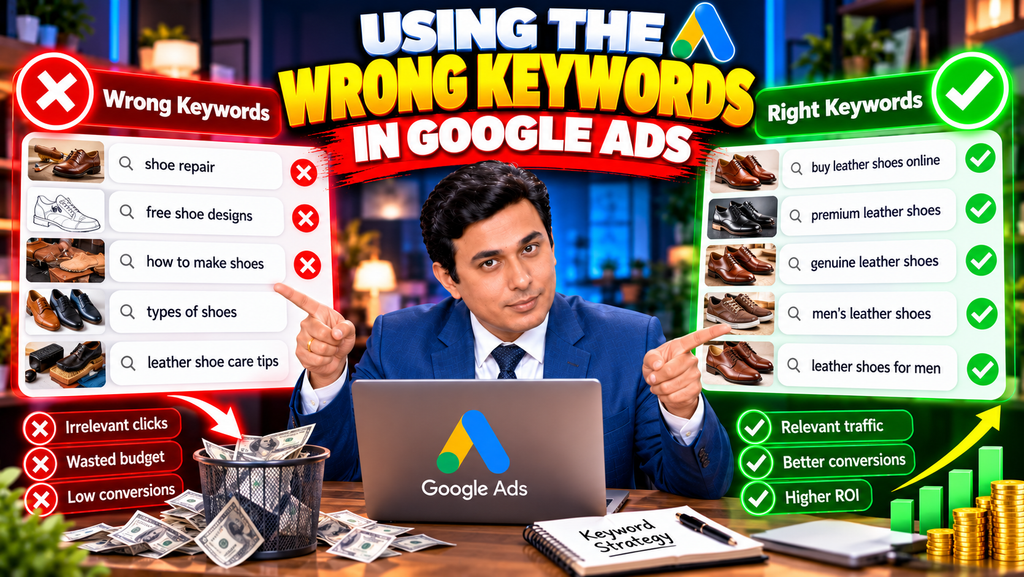
Imagine you sell premium leather shoes online.
You want to target people searching for leather shoes to buy. However, your advertisements also appear for searches related to shoe repair, free shoe designs, or instructions for making shoes.
These searches may be relevant to the broader topic of shoes, but they don’t necessarily match your business objective.
The result? You spend money attracting visitors who are unlikely to convert.
How to Fix This Mistake
Start by researching keywords that closely match your products, services, and campaign objectives.
Understand the difference between broad match, phrase match, and exact match keywords.
Broad match can help you discover additional relevant searches, particularly when paired with conversion-focused Smart Bidding. However, it can also expand your reach beyond the searches you initially expected. It should be monitored rather than automatically avoided. Google Ads explains how broad match works.
If you’re starting with a limited budget or have little conversion data, consider using phrase and exact match strategically while monitoring actual search queries.
For example, an online shoe store might test keywords such as:
- “buy leather shoes online”
- “men’s leather formal shoes”
- [buy leather shoes]
Choose match types according to your campaign structure, budget, and ability to manage search traffic.
The goal isn’t to attract the maximum number of clicks. It’s to attract relevant potential customers.
2. Sending Every Visitor to Your Homepage
Here’s another mistake businesses frequently make: sending all their Google Ads traffic to the homepage, regardless of what the advertisement promises.
Imagine a customer searches for “buy running shoes online” and clicks your advertisement.
Instead of seeing running shoes, the customer lands on a homepage containing multiple product categories, company information, banners, and unrelated offers.
What happens next?
The customer has to search for the product again, navigate through categories, and locate the relevant item. Some visitors will complete that journey, but others may leave.
Every unnecessary step can create friction.
How to Fix This Mistake
Match your final URL to the product, service, or offer promoted in your advertisement.
For example:
- Product advertisement: Send visitors directly to the relevant product page.
- Collection advertisement: Send visitors to the appropriate product collection.
- Service advertisement: Send visitors to the specific service page.
- Lead-generation advertisement: Send visitors to a relevant landing page with a clear enquiry form.
Suppose you’re advertising a particular smartphone. Instead of sending customers to your electronics store homepage, take them directly to the smartphone’s product page, where they can review its specifications, price, availability, and purchase options.
This reduces unnecessary navigation and creates a more consistent experience between the search, advertisement, and landing page.
Also ensure that your landing page loads properly on mobile devices, communicates the offer clearly, and makes the next step easy.
A relevant landing page doesn’t guarantee conversions, but it gives visitors a more direct path towards completing the desired action.
3. Ignoring Negative Keywords
You can select relevant keywords and still receive irrelevant traffic.
Why? Because the search queries that trigger your advertisements may not always match your business requirements.
This is where negative keywords become important.
Negative keywords help prevent your advertisements from appearing for searches that you don’t want to target.
For example, imagine you sell paid digital marketing courses.
Your campaign may attract searches related to free courses, free downloads, or jobs if those searches aren’t appropriate for your offering.
If these searches generate clicks without qualified enquiries, your budget may be going towards the wrong audience.
How to Fix This Mistake
Regularly review your Search terms report in Google Ads.
This report helps you understand the actual search terms that triggered your advertisements and identify irrelevant queries.
For example, you might discover searches such as:
- Free digital marketing course
- Digital marketing jobs
- Digital marketing course PDF
If your campaign is designed to generate enquiries for a paid training programme, some of these queries may be suitable candidates for negative keywords.
However, don’t exclude a term simply because it contains the word “free” or “job.” Check whether the query is genuinely irrelevant to your business and campaign objective first.
You should also understand negative keyword match types before applying exclusions, as they determine which searches are blocked.
Google’s guidance recommends using search-term data to identify irrelevant searches and add appropriate negative keywords. Read Google’s guide to keyword and search-term management.
Make reviewing search terms a regular optimization task rather than waiting until your budget has already been wasted.
4. Targeting the Wrong Search Intent
Not every person searching on Google is ready to buy.
Some users want information. Others are comparing alternatives. Some are actively looking for a product or service to purchase.
These differences represent search intent, and understanding them is essential for effective Google Ads campaigns.
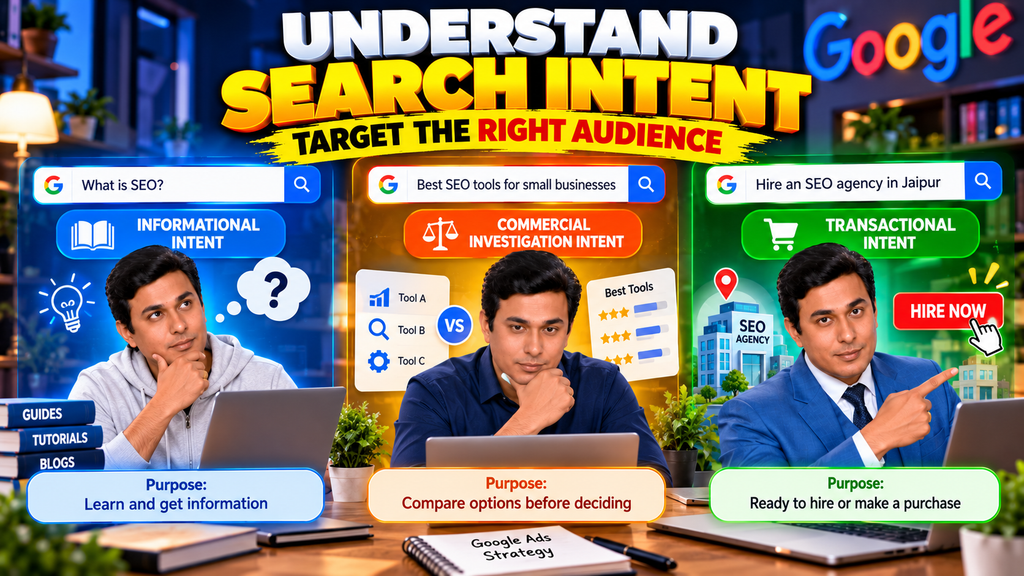
Consider these three searches:
- “What is SEO?” — primarily informational intent.
- “Best SEO tools for small businesses” — comparison or commercial investigation intent.
- “Hire an SEO agency in Jaipur” — stronger service-buying intent.
The same business may find all three searches useful, but they don’t necessarily serve the same campaign objective.
If your goal is to generate immediate enquiries, spending most of your budget on broad informational searches may not be the best approach.
How to Fix This Mistake
Start by defining what you want users to do after clicking your advertisement.
If your objective is to generate leads, identify searches that indicate a need for your service. If you’re selling products, prioritize relevant product searches and purchasing opportunities.
You can also create separate campaigns or ad groups for different search intents when doing so improves relevance and measurement.
For example, an SEO agency might create one campaign targeting businesses looking to hire an SEO service provider and a separate content initiative explaining SEO concepts to beginners.
Informational traffic can still be valuable for brand awareness and future conversions. The important thing is to align your keywords, landing pages, bidding strategy, and expectations with the purpose of each campaign.
5. Optimizing for Clicks When Your Goal Is Conversions
Imagine your objective is to generate qualified leads for a real estate business.
You launch a Google Ads campaign, and your advertisements receive plenty of clicks. However, very few visitors submit an enquiry or schedule a property viewing.
Would you consider the campaign successful?
Not necessarily.
Clicks indicate that someone interacted with your advertisement. They don’t automatically indicate a lead, a sale, or a profitable customer.
If your objective is conversions, optimizing solely for clicks may encourage you to focus on traffic volume instead of the outcomes your business actually needs.
How to Fix This Mistake
First, configure conversion tracking for the actions that matter to your business.
Depending on your business model, these might include:
- Completed purchases
- Qualified lead submissions
- Appointment bookings
- Calls that meet your qualification criteria
- Other meaningful business actions
Then choose a bidding strategy aligned with your objective and the data available to your campaign.
Google Ads offers conversion-focused Smart Bidding strategies, including Maximize conversions and Target CPA. For campaigns focused on conversion value, strategies such as Maximize conversion value and Target ROAS may be appropriate. The right option depends on your goals and circumstances. See Google’s Smart Bidding guidance.
Remember that conversion tracking must be implemented correctly. If your campaign records page views as conversions when your actual objective is qualified enquiries, the system may optimize towards the wrong outcome.
Before optimizing your campaign, make sure Google Ads is measuring the result you genuinely want.
6. Making Campaign Changes Too Frequently
When a Google Ads campaign doesn’t deliver immediate results, it’s tempting to change everything.
You modify keywords, adjust budgets, change bidding strategies, rewrite advertisements, and alter targeting settings within a short period.
Then, before you can understand the effect of those changes, you make more adjustments.
This creates a problem: you may struggle to determine which changes improved performance and which ones made it worse.
For campaigns using automated bidding, certain significant changes can also trigger or affect the bid strategy’s learning period.
However, it’s important to understand that not every campaign edit automatically restarts the learning phase. The impact depends on the type and scale of the change.
How to Fix This Mistake
Give your campaigns sufficient time to collect meaningful performance data, taking conversion delays and the length of your sales cycle into account.
Before making an adjustment, identify the problem you’re trying to solve.
For example, if your cost per lead has increased, investigate whether the cause is higher click costs, a lower conversion rate, poorer lead quality, or a change in demand.
Then make a targeted adjustment and evaluate its effect.
Avoid unnecessary changes during a learning period, especially significant changes to bidding strategies, conversion goals, or other settings that affect automated optimization.
At the same time, don’t leave an obviously broken campaign untouched just because you want to preserve the learning phase. Correct serious tracking, targeting, or budget problems when necessary.
The goal is disciplined optimization—not avoiding all changes.
7. Writing Ad Headlines and Descriptions That Don’t Match Search Intent
Your keywords may be relevant, your bidding strategy may be appropriate, and your landing page may be well designed. Yet your advertisements can still underperform if their messaging doesn’t connect with what users are searching for.
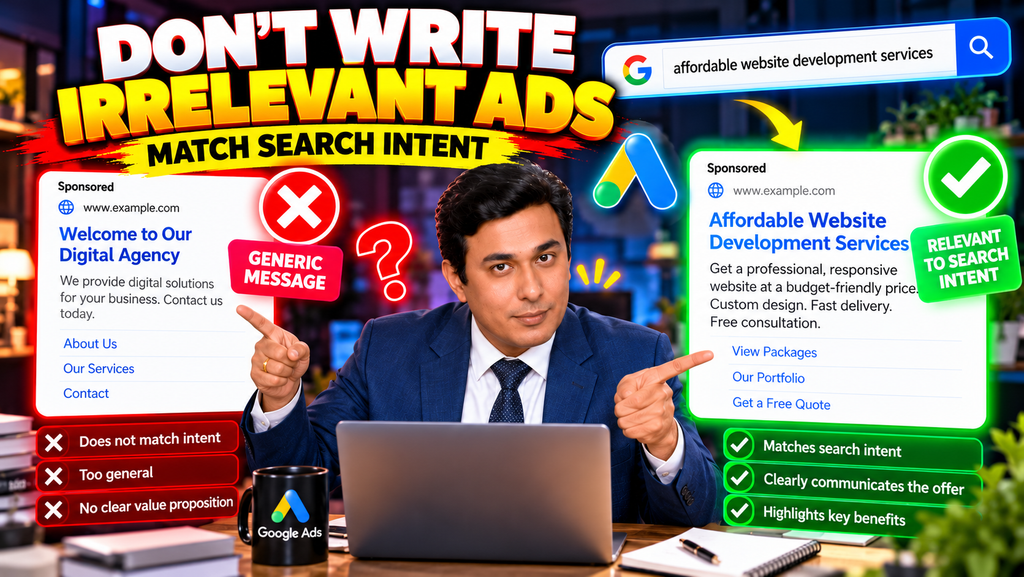
Imagine someone searches for “affordable website development services.”
Your advertisement says, “Welcome to Our Digital Agency.”
The message is generic. It doesn’t clearly address the user’s requirement or explain why they should choose your business.
Now consider an advertisement that communicates relevant website development services, a clear value proposition, and a suitable next step.
The second approach gives the searcher a clearer reason to consider your offer.
How to Fix This Mistake
Use your Search terms report and keyword performance data to understand the language your potential customers use.
Then write relevant headlines and descriptions that reflect their needs, the service you’re offering, and the benefit of taking action.
For example, a website development business might test headlines such as:
- Website Development Services
- Professional Business Websites
- Request a Website Quote
Use the messaging that accurately reflects your offering. Avoid unsupported claims, misleading promises, or irrelevant keywords added solely to attract attention.
For responsive search ads, provide multiple relevant headlines and descriptions so Google can test different combinations.
Also, don’t judge your ad copy exclusively by clicks. A headline that attracts more visitors isn’t necessarily better if those visitors rarely become qualified leads or customers.
Evaluate the relationship between search relevance, click-through rate, conversion rate, lead quality, and business outcomes.
Bonus Tip: Don’t Ignore Your Campaign Data
Even if you avoid these seven mistakes, your Google Ads campaigns still need regular monitoring.
Review the metrics that relate to your business objectives, including:
- Search terms and keyword performance
- Click-through rate and cost per click
- Conversion rate and cost per conversion
- Lead quality and sales conversion rate
- Revenue, conversion value, or return on ad spend where applicable
Look for patterns rather than reacting to every short-term fluctuation.
For example, a campaign may generate inexpensive leads, but if those leads rarely become paying customers, its low cost per lead may be misleading.
Likewise, a campaign with a higher cost per lead might deliver more valuable customers and stronger profitability.
The right decision depends on the complete customer journey and the economics of your business.
Conclusion: Stop Wasting Your Google Ads Budget
Google Ads can be an effective way to attract potential customers, generate leads, and increase sales. But simply launching a campaign doesn’t guarantee results.
The difference often comes down to how carefully you choose keywords, match advertisements to landing pages, manage negative keywords, understand search intent, configure conversion tracking, and optimize your campaigns.
Start by identifying the biggest weakness in your current campaign. Review your Search terms report, check whether your conversion tracking is accurate, and confirm that your landing pages match the promises made in your advertisements.
Then make informed adjustments based on meaningful data.
You don’t always need a bigger advertising budget to improve performance. Sometimes, you need to stop paying for the wrong traffic and make better use of the budget you already have.
Remember: successful Google Ads campaigns aren’t just about getting clicks. They’re about attracting the right customers and turning advertising expenditure into measurable business value.
Frequently Asked Questions
1. What are the most common Google Ads mistakes?
Common mistakes include selecting irrelevant keywords, ignoring negative keywords, sending visitors to unsuitable landing pages, targeting the wrong search intent, using inappropriate bidding goals, making poorly informed changes, and writing irrelevant ad copy.
2. How can I reduce wasted Google Ads spend?
Review search terms regularly, exclude irrelevant queries, improve landing-page relevance, configure accurate conversion tracking, and evaluate campaign performance against meaningful business goals.
3. Should I avoid broad match keywords in Google Ads?
Not necessarily. Broad match can help identify additional relevant searches, especially when combined with Smart Bidding. However, you should monitor search-term quality, conversion performance, and budget efficiency before deciding how extensively to use it.
4. Why are my Google Ads getting clicks but no conversions?
Possible causes include irrelevant traffic, weak offers, slow or confusing landing pages, an inconvenient conversion process, incorrect conversion tracking, or a mismatch between search intent and your offer. Investigate the full customer journey before making changes.
5. Does editing a Google Ads campaign restart the learning phase?
Not every edit does. Certain significant changes, particularly those affecting automated bidding, conversion goals, or campaign composition, can trigger or affect learning. Check the bid strategy status and make changes based on the issue you’re trying to solve.
6. Should I optimize Google Ads for clicks or conversions?
Choose according to your business objective. If your goal is qualified leads or sales, conversion-focused bidding may be more appropriate when conversion tracking is reliable and sufficient data is available. Click-focused bidding can be useful when traffic acquisition itself is the objective, but clicks alone don’t establish profitability.

Related Posts