
Uses your browser’s reading voice.
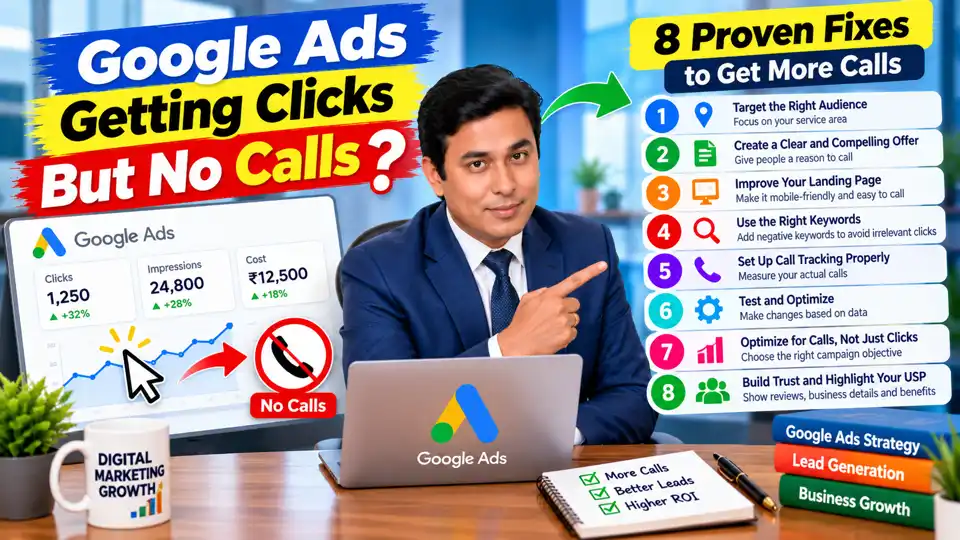
Spending money on Google Ads but getting no calls can be frustrating. You see clicks coming in, your advertising budget keeps getting spent, but your phone stays silent.
Many business owners experience this problem when they start advertising without a clear strategy. They assume that more clicks will automatically bring more customers, only to discover that website traffic does not always translate into business enquiries.
The good news is that it does not necessarily mean Google Ads is not working. The problem could be your targeting, keywords, advertisement, landing page, offer, or conversion tracking.
The important thing is to identify where potential customers are dropping off before spending more money.
In this guide, you will learn why Google Ads may generate clicks but no calls, how to diagnose the problem, and what you can do to improve your campaign performance.
Why Is Google Ads Getting Clicks but No Calls?
When people click your advertisements but do not call, something may be going wrong between the search and the conversion.
For example, a dental clinic in Bikaner might receive clicks from people searching for dental services. However, if its ads target people across a much wider area, many visitors may be too far away to visit.
Similarly, a plumbing business may attract visitors with a generic advertisement, but potential customers may choose a competitor whose offer is clearer.
Before changing your bids or increasing your budget, investigate these eight common problems.
1. You Are Targeting the Wrong Audience
One of the first things to check is whether your advertisements are reaching people who can realistically become customers.
Imagine you run a dental clinic in Bikaner, Rajasthan, but your campaign targets a large geographical area without considering where patients can conveniently visit. You may receive clicks from people who are interested in dental treatment but are unlikely to travel to your clinic.
Those clicks can consume your budget without producing appointments.
How to fix your targeting
Start by reviewing your campaign's location settings and performance by geographical area.
- Target locations that are relevant to your service area.
- Review the actual locations associated with your ad traffic.
- Check whether the location option matches your campaign goals.
- Exclude areas that are consistently irrelevant to your business.
- Review audience and device performance where sufficient data is available.
For local businesses, check whether the campaign is configured to reach people who are physically present in or regularly in your targeted locations, if that is what your business needs. The available location options and wording can vary by campaign setup.
Also consider the nature of your service. A local plumber may need a tightly defined service area, while an online consulting business may serve customers throughout India.
Practical tip: Do not target a large geographical area simply because it provides more potential impressions. Focus on the locations where you can actually serve customers profitably.
2. Your Ad Is Getting Clicks but Your Offer Is Not Convincing
Getting a click is only the first step. After seeing your advertisement, potential customers need a clear reason to choose your business.
Consider two hypothetical advertisements for a plumbing service.
The first says:
"Best Plumbing Services"
The second says:
"Plumbing Repairs in Your Area — Request a Service Visit"
The second communicates the service and a possible next step more clearly. It gives the user a better understanding of what to expect.
This does not mean that a particular headline will always perform better. The right message depends on the search query, customer needs, and actual services offered.
How to improve your ad copy
Make your advertisements specific, relevant, and trustworthy.
- Mention the service you provide.
- Highlight a genuine customer benefit.
- Include your service area when relevant.
- Explain what makes your business different.
- Use a clear call to action.
- Avoid exaggerated claims or promises you cannot fulfil.
For example, a digital marketing agency might test an advertisement that focuses on Google Ads management for local businesses rather than a generic message about digital marketing.
Your advertisement should answer a potential customer's basic question: "Why should I choose this business?"
3. Your Landing Page Is Losing Potential Customers
This is one of the easiest problems to overlook.
Someone clicks your advertisement expecting information about a particular service. However, the website loads slowly, looks confusing on a mobile phone, or makes the contact number difficult to find.
The visitor may leave without calling.
A landing page should make it easy for someone to understand your offer and take the next step.
How to optimize your landing page for phone calls
Make your phone number visible. Place it prominently near the top of the page, especially if calls are your primary conversion goal.
Add a click-to-call button. Mobile visitors should be able to tap the number and initiate a call easily.
Match the page to the advertisement. If your ad promotes dental implants, send visitors to a relevant dental implant page rather than a generic homepage.
Improve mobile usability. Check that text is readable, buttons are easy to tap, and important information is not hidden.
Build trust. Provide accurate business details, genuine reviews, service information, and clear explanations of your offering.
Reduce unnecessary friction. Avoid overwhelming visitors with pop-ups, lengthy forms, or irrelevant information.
Check loading performance. Test the page on mobile devices and fix avoidable delays.
Remember that a landing page does not need to be complicated. It needs to give the right visitor the information they need and make contacting you straightforward.
4. Your Keywords Are Attracting the Wrong Searches
Your keyword selection determines which searches may trigger your advertisements. If your campaign attracts people who are researching a topic rather than looking for your service, you may pay for clicks that are unlikely to convert.
For example, suppose you sell paid digital marketing services.
Your ads might appear for searches such as:
- Free digital marketing course
- How to learn digital marketing
- Digital marketing jobs
- Digital marketing salary
Depending on your offering, these searches may attract people who want education or employment rather than an agency.
They are not necessarily bad searches in every situation, but they may be irrelevant to your particular campaign.
How to find and remove irrelevant keywords
Open the Search terms report in Google Ads and examine the actual queries that triggered your ads.
Look for searches that:
- Have little connection to your services.
- Indicate an audience you cannot serve.
- Focus on free alternatives when you sell a paid service.
- Generate clicks but no meaningful enquiries.
- Reflect a different search intent from your advertisement.
Add suitable negative keywords to prevent your ads from appearing for irrelevant searches.
You should also review keyword match types and consider more specific terms when they better represent your customers' needs.
For instance, "Google Ads management services for small businesses" may be more closely aligned with an agency's offering than a broad query about online advertising.
Do not exclude a search term simply because it has a high cost per click. Evaluate its relevance and conversion potential before making a decision.
5. Your Call Tracking Is Not Set Up Correctly
Sometimes, a campaign may be generating calls that are not being recorded properly. In other cases, people may click a phone number without completing a call.
Without reliable conversion tracking, it becomes difficult to understand which campaigns are producing genuine enquiries.
Google Ads can track eligible calls from advertisements and, with an appropriate setup, certain calls made through your website. The available options depend on your location, account, and tracking configuration.
What you should check
- Whether call reporting and relevant conversion actions are configured.
- Whether calls from advertisements are being recorded correctly.
- Whether website phone numbers and click-to-call buttons work.
- Whether your conversion actions count meaningful calls rather than every click on a phone number.
- Whether call duration or other suitable criteria help distinguish useful enquiries from accidental or very short calls.
- Whether the reporting time zone and attribution settings are understood.
If you use a CRM or lead management system, compare advertising data with actual enquiries received by your business.
For example, if your receptionist confirms that several people called after seeing your advertisements but Google Ads reports no conversions, investigate the tracking setup before assuming the campaign has failed.
Important: A click on a phone number is not the same as a completed phone call. Track actual calls wherever your setup allows it.
6. Your Budget Is Being Spent Without Enough Testing
Another common mistake is making decisions too quickly or allowing a poorly performing campaign to continue without investigation.
If you launch a campaign today, you should not automatically expect several calls tomorrow. Results depend on demand, competition, budget, conversion rates, and many other factors.
At the same time, you should not keep spending blindly while waiting for results.
Review campaign performance to determine what is happening.
| What you observe | What to investigate |
|---|---|
| Very few impressions | Budget, bids, keyword demand, ad eligibility, and targeting |
| Impressions but few clicks | Search relevance, ad copy, and expected audience |
| Many clicks but no calls | Search terms, landing page, offer, and call tracking |
| Calls but few qualified enquiries | Audience relevance, service details, and lead quality |
| Qualified calls but few sales | Pricing, sales process, follow-up, and service fit |
Use this table as a diagnostic starting point rather than a set of guaranteed explanations.
Review enough data to identify meaningful patterns, taking your budget, sales cycle, and conversion volume into account.
Make changes based on evidence instead of repeatedly changing bids, targeting, and advertisements at the same time.
7. Your Business Offer or Call to Action Is Weak
Even when your ads reach the right people, visitors may not call if your offer is unclear or the next step feels difficult.
Imagine someone searches for an emergency electrician. Your advertisement takes them to a page that lists several services but does not explain how to request help or how to contact the business.
The visitor may choose another provider whose contact information is easier to find.
Make the next step clear
Review your offer from the customer's perspective.
- Is it clear what service you provide?
- Does the page explain who the service is for?
- Can visitors understand the next step immediately?
- Are your contact details accurate?
- Have you explained relevant pricing or service conditions where appropriate?
- Is the enquiry process simple?
Use a call to action that reflects the action you want people to take, such as "Call for an Appointment" or "Request a Service Estimate," when those options accurately describe your process.
Also evaluate your unique selling proposition. If your business gives visitors no clear reason to choose it over competing providers, more clicks may not solve the problem.
8. You Are Optimizing for Clicks Instead of Calls
This is an important distinction.
If your campaign is optimized primarily to generate clicks, Google Ads may seek users who are likely to click, rather than specifically users who are likely to complete a phone call.
That does not mean click-focused campaigns never generate calls. It means the campaign objective and optimization settings should align with the result you actually want.
How to align your campaign with phone calls
- Choose a suitable campaign objective and conversion goal.
- Configure relevant call conversion actions.
- Check that conversion tracking is recording meaningful results.
- Review available bidding strategies and their requirements.
- Evaluate cost per call and cost per qualified lead, not just CPC.
- Avoid making conversion-based bidding decisions using unreliable or incomplete tracking data.
Automated bidding strategies depend on the campaign type, configuration, and available conversion data. Before switching strategies, confirm that your conversion actions are accurate and that the strategy fits your business objective.
The goal is to teach your campaign what a valuable result looks like, while maintaining enough budget and data to assess performance.
What I Would Check First If Google Ads Generated Clicks but No Calls
If I were troubleshooting a campaign that had spent money without producing calls, I would begin with three checks.
First: Review the Search terms report
Are the people clicking the ads actually looking for the service you provide?
If many searches are irrelevant, improve keyword targeting and add suitable negative keywords.
Second: Test the landing page
Open the page on a mobile device. Can you understand the offer and call the business within a few seconds?
If not, make the phone number more visible, improve usability, and remove unnecessary friction.
Third: Verify conversion tracking
Confirm that calls are being recorded accurately and that your reports reflect meaningful enquiries.
Once these three areas have been checked, review the ad copy, campaign objective, budget, bidding strategy, and lead-handling process.
This approach helps you narrow down the cause before spending more money.
How to Measure Whether Your Google Ads Campaign Is Improving
Do not evaluate campaign performance only by the number of clicks or the average CPC.
Track the metrics that reflect your business goals.
Average CPC: How much you pay per click on average.
Call conversions: The number of calls recorded as conversions according to your tracking configuration.
Cost per call conversion: Advertising cost divided by the number of recorded call conversions.
Qualified lead rate: The proportion of enquiries that meet your business's criteria for a potential customer.
Cost per qualified lead: Advertising cost divided by the number of qualified leads.
Conversion rate: The percentage of measured interactions that result in the defined conversion, according to the reporting setup.
Cost per acquisition: The advertising cost associated with acquiring a customer, when customer acquisition can be measured reliably.
For example, a campaign that generates ten relevant enquiries may be more valuable than one that generates thirty clicks without any genuine leads.
Where possible, connect your advertising reports with sales or CRM data so you can distinguish calls from qualified opportunities and actual customers.
Learn More About Google Ads Optimization
Troubleshooting a campaign becomes easier when you understand keyword selection, targeting, campaign objectives, bidding, and conversion tracking.
If you want to explore these topics step by step, browse these practical Google Ads tutorials for additional guidance on building and optimizing campaigns.
Use the concepts that are relevant to your current campaign rather than changing every setting at once.
Frequently Asked Questions
Why is my Google Ads campaign getting clicks but no calls?
Common causes include irrelevant search terms, poorly matched location targeting, an unconvincing offer, a weak landing page, incorrect call tracking, or a campaign optimized for clicks rather than calls. Review these areas before increasing your budget.
Should I increase my Google Ads budget if I am not getting calls?
Not before investigating the problem. More budget may increase traffic, but it will not necessarily fix irrelevant clicks, poor landing page performance, or tracking issues. First identify where the campaign is underperforming.
How do I get more phone calls from Google Ads?
Target relevant searches and service areas, write clear advertisements, make your phone number easy to find, create a mobile-friendly landing page, and configure suitable call conversion tracking. Monitor the quality and cost of the calls you receive.
Are high CPCs the reason I am not getting calls?
Not necessarily. High CPC means you are paying more for each click, but it does not explain why visitors are not calling. Investigate traffic relevance, the offer, the landing page, and conversion tracking to identify the underlying issue.
How long should I wait before changing my Google Ads campaign?
There is no universal waiting period. Consider the amount of traffic, available conversion data, business demand, and sales cycle. Fix obvious technical errors immediately, but avoid making major strategic decisions based on very limited data.
Conclusion
Google Ads getting clicks but no calls is a problem worth investigating before you spend more money.
The issue may be the audience you are targeting, the keywords triggering your ads, the offer you present, the landing page experience, or the way you measure phone calls. In some cases, the campaign is generating traffic but is optimized for the wrong outcome.
Start with your search terms report, test the landing page on mobile, and verify call conversion tracking. Then use the evidence to improve your targeting, advertising message, and campaign settings.
Google Ads is not just about getting more clicks. It is about reaching the right people, giving them a compelling reason to contact you, and making it easy for them to take the next step.
Remember: more clicks do not automatically mean more customers. The real goal is to turn relevant clicks into genuine business enquiries.